
Github login with FastAPI and Next.js
A practical example of implementing Github OAuth in FastAPI, and why Next.js server actions and API routes are convenient for managing cookies and domains.
· tutorials · 14 minutes
Introduction
In this article, we will show how to implement Github login in a FastAPI and Next.js application. We use Github in this particular case, but the same approach applies to any OAuth provider, you only need to adjust the FastAPI redirect and callback endpoints. Since this is a Next.js app using server components, we will store the session in an HttpOnly cookie. We will dig into implementation details such as domains, cookies, redirects, and overall structuring to achieve a clean, maintainable, and robust solution.
OAuth flow reminder
OAuth2 flow sequential diagram: (Source gist)
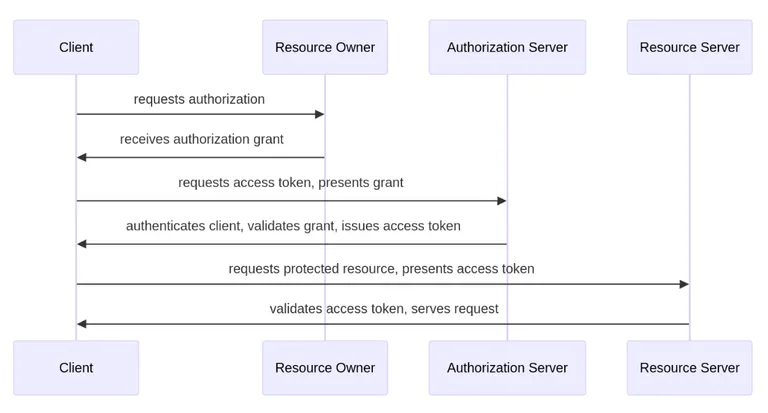
Let’s begin with a quick reminder of how OAuth works in very simplified terms. OAuth is built around the principle of a trusted middleman: both we (our app) and the user know who Github is (the authorization server) and trust it. This means we can use Github to identify the user and obtain their information. For the user, this means Github vouches for our app’s identity and legitimacy, clearly showing what information the app will access and at what level, so the user can give informed consent. Of course, there are many more implementation details, but this is enough for a high-level overview.
For our app, this practically means we need to register it with Github, obtain the app’s client ID and client secret, and then, in the backend, use an OAuth client library to implement two endpoints:
- An endpoint that redirects the user to Github, where they can give consent.
- A callback endpoint where Github redirects the user back to us, passing an authorization code that the auth library can exchange for an access token, which is then used to call Github APIs and obtain additional information about the user.
Additionally, within the callback endpoint we store the user’s information (email, OAuth ID, name, avatar, etc.) in the database and use the autogenerated database user ID to generate a JWT access token, in the same way we do for a regular email/password authenticated user.
In this way, we achieve a unified interface for authenticating users, regardless of whether they log in with Github or via email/password.
Architecture overview
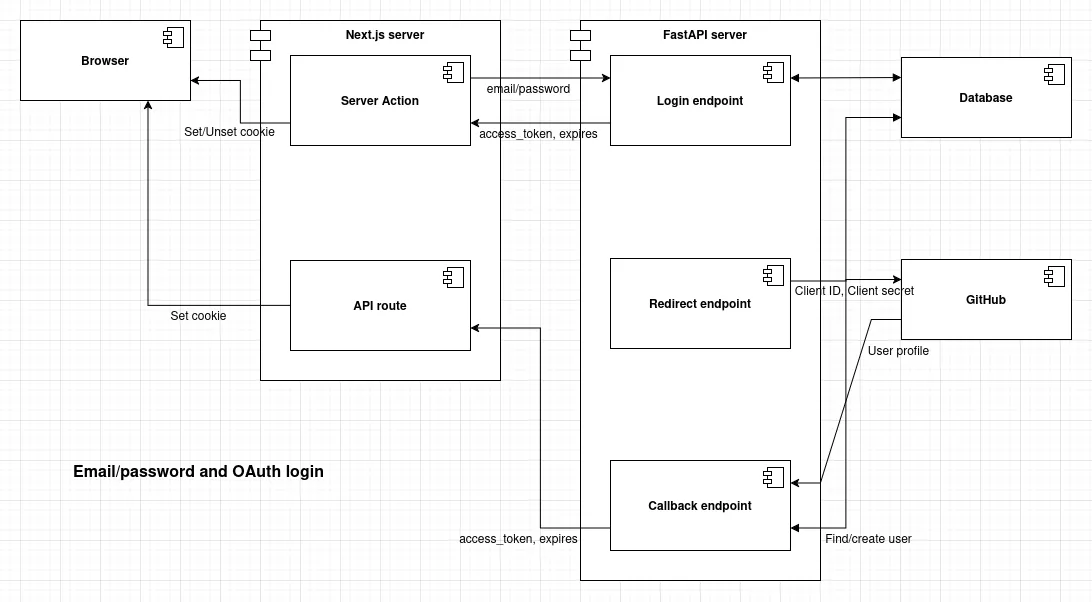
Architecture diagram:
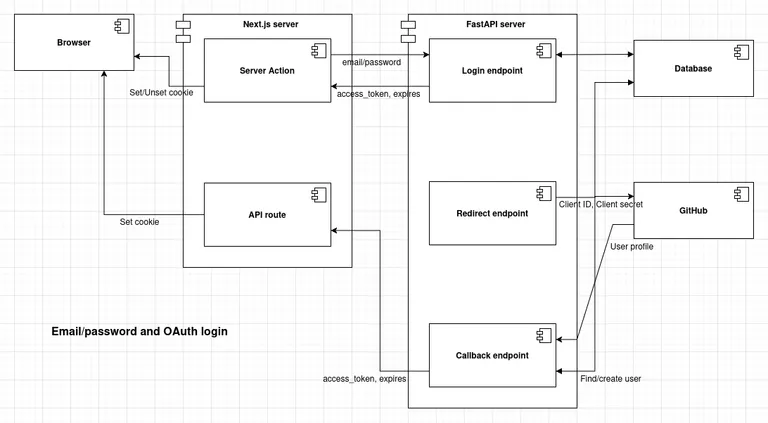
The one obvious and constant assumption is that we will use a FastAPI backend and a Next.js frontend. When it comes to authorization, this leaves additional room for deciding how we structure the logic and separate concerns. There is more than one way to do this, and some approaches can be fragile and hard to maintain, which is exactly what we want to avoid.
Let’s go straight to the point and explain the optimal approach that we will use, and then briefly touch on some suboptimal alternatives and the kinds of problems they introduce.
-
Since we use Next.js and server components, we will store the session in an HttpOnly cookie so we can have private, server-side rendered pages. This means
localStorageis not used for storing authentication state. -
The frontend and backend are separate applications, which means they run as separate Node.js and Python processes and are deployed as separate containers (reminder: Docker containers are meant to run a single process per container). This also applies to the domains on which the frontend and backend run. Ideally, we want complete freedom to use any unrelated domains for both, without making assumptions about subdomains, prefixes, or shared domain structure.
-
Cookies are tightly coupled to domains: a browser will accept and store a cookie only if it is set by a server running on the correct domain. The fact that Next.js provides API functionality is very fortunate, because those endpoints run on the same domain as the rest of the Next.js app (pages) and can set cookies for that exact domain. This removes the need to deal with cross-domain cookies, which are often complex and fragile.
-
Cookies are tied to a domain and are impractical for passing arguments via HTTP responses. Cookies are meant for storing data, not for transmitting it. Consequently, for passing the
access_tokenandexpiresvalues, we will use the response body (for server actions) and URL query parameters (for the OAuth redirect). Response bodies and URL query parameters are domain-independent and are designed for passing data between HTTP requests. -
Separation of concerns on the backend: FastAPI will contain all backend logic, including authorization. This means it will implement both OAuth endpoints (the redirect and callback endpoints). Next.js will handle cookie setting and unsetting logic: via server actions for email/password login, and via Next.js API routes for Github login. As a reminder, a server action is essentially a POST endpoint under the hood and can set or unset cookies.
-
The OAuth callback endpoint in FastAPI needs to initiate an uninterrupted redirect chain composed of two steps (FastAPI and Next.js API):
Github -> FastAPI callback redirect -> Next.js API redirect -> Next.js home page. During this process, theaccess_tokenandexpiresvalues need to be passed as query parameters appended to the URL. Redirects are mandatory because the entire flow is driven by the browser, and we do not want the user’s browser to just land on a raw API response, but rather on the website’s home page as a successfully logged-in user.
Suboptimal approaches and their problems
There is some ambiguity caused by the redundancy of options, which can lead to suboptimal solutions if we do not think clearly enough. Let’s discuss some of them:
-
Since we have two backend-capable frameworks, we might be tempted to move a significant part of the authorization logic into Next.js APIs, for example, implementing the OAuth redirect endpoint, the callback endpoint, or even the email/password authentication endpoints there. This would introduce several serious problems, including unnecessary coupling of two backends to the same database and schema, backend deployment being split across two containers that must stay in strict sync, fragmented configuration and secrets management, violation of the “single source of truth” principle, potential read/write race conditions, and increased debugging and logging complexity.
To prevent all of this, we enforce a clear separation of concerns: FastAPI acts as a complete, standalone backend, while Next.js APIs (and server actions) are responsible only for setting and unsetting cookies. Since Next.js runs on the frontend domain, this approach drastically simplifies and hardens cookie handling.
-
Another pitfall is relying on cross-domain cookies by making assumptions about the domains used by the frontend and backend. For example, we might assume
SITE_URL=https://my-website.comfor the frontend andAPI_URL=https://api.my-website.comfor the backend. In that case, the backend could tweak cookie properties such asSameSite=NoneandDomain=.my-website.comto get the browser to accept and store the cookie.This introduces additional complexity and fragility into the authentication flow and deployment reliability, along with a number of problems and limitations. Some of them include a major mismatch between email/password login (where the cookie is set directly via a server action) and OAuth login, the inability to host the frontend and backend on completely different, unrelated domains (which is a legitimate requirement), and the inability to host the backend on a PaaS that uses domains included in the public suffix list (https://publicsuffix.org/list/), such as
vercel.app.Once again, this is solved by letting the Next.js API (and server actions) handle setting and unsetting cookies.
Implementation
That was a lot of text but still no code. On the other hand when we have clear mental model and worked out plan implementation is straight forward.
Create OAuth app on Github
Like with any OAuth provider we need to register our app on Github and obtain client id and client secret. One Github specific is that you can have set only one redirect URL per app, so if you want multiple deployments you will need to create a separate app for each of them.
It’s a straight forward process, go to your Github profile and open the following menus: Github (top-right avatar) -> Settings -> Developer settings (bottom of the left sidebar) -> OAuth Apps -> New OAuth App. Fill in your app info, including redirect URL where you should set the URL of your FastAPI callback endpoint, e.g. https://api.my-website.com/api/v1/auth/github/callback.
Then copy Client ID and Client secret and set inside the backend .env file.
# ...
GITHUB_CLIENT_ID=Ov23liasdxhfaOJasdf12GITHUB_CLIENT_SECRET=c9ad7bc12977515fed61409492abe169212345
# ...
Instantiate OAuth client
We need to install OAuth client library, we will use authlib/authlib.
# Activate venvsource .venv/bin/activate
# Install authlibpoetry add authlib
Then we can instantiate OAuth client:
GITHUB_OAUTH_CONFIG = {    "name": "github",    "client_id": settings.GITHUB_CLIENT_ID,    "client_secret": settings.GITHUB_CLIENT_SECRET,    "access_token_url": "https://github.com/login/oauth/access_token",    "authorize_url": "https://github.com/login/oauth/authorize",    "api_base_url": "https://api.github.com/",    "client_kwargs": {"scope": "user:email"},}

def create_oauth() -> OAuth:    oauth = OAuth()    oauth.register(**GITHUB_OAUTH_CONFIG)    return oauth

oauth = create_oauth()
Define OAuth endpoints in FastAPI
We can then use the instantiated OAuth client to implement the OAuth redirect and callback endpoints.
The redirect endpoint is quite simple, almost trivial. When the user hits this endpoint, they are redirected to the Github login page, where they can give consent. The redirect_uri variable contains the absolute URL of our callback endpoint, which we define next.
@router.get("/login/github")async def login_github(request: Request):    """    Redirect to Github login page    Must initiate OAuth flow from backend    """    redirect_uri = request.url_for("auth_github_callback")  # matches function name
    # rewrite to https in production    if is_prod:        redirect_uri = redirect_uri.replace(scheme="https")
    return await security.oauth.github.authorize_redirect(request, redirect_uri)
Now we can define the callback endpoint, which is where Github sends the user after they have logged in on Github. This part is a bit more complex.
Github includes an authorization code as a URL parameter, which we use to obtain an OAuth access token. We then use this token to call two separate Github APIs: one to retrieve the user’s profile information (full name, username, and OAuth ID), and another to retrieve the user’s primary email address. Next, we find or create the user in our database. Finally, we use the user’s database ID to create a JWT token, in exactly the same way as we do for a regular email/password user.
Next, we calculate the expires value for the session cookie so that it matches the JWT access_token expiration. We then attach the access_token and expires values as query parameters to the redirect URL. The redirect URL is constructed as f"{settings.SITE_URL}/api/auth/set-cookie", pointing to a Next.js API endpoint (which we define next) that is responsible for actually setting the cookie. Finally, we redirect the user.
Once again, it is important to emphasize that the redirect is essential so the browser can follow the entire chain. We do not want the user to land on a raw API response, the home page is the final destination after a successful login.
@router.get("/auth/github/callback")async def auth_github_callback(    request: Request, session: SessionDep) -> RedirectResponse:    """    Github OAuth callback, Github will call this endpoint    """    # Exchange code for access token    token = await security.oauth.github.authorize_access_token(request)
    # Get user profile Github API    user_info = await security.oauth.github.get("user", token=token)    profile = user_info.json()
    # Get primary email Github API    emails = await security.oauth.github.get("user/emails", token=token)    primary_email = next((e["email"] for e in emails.json() if e["primary"]), None)
    logger.info(f"Primary Github email: {primary_email}")
    # Authenticate or create user    user = crud.authenticate_github(        session=session,        primary_email=primary_email,        profile=profile,    )
    expires_delta = timedelta(hours=settings.ACCESS_TOKEN_EXPIRE_HOURS)
    access_token = security.create_access_token(user.id, expires_delta)
    # Absolute expiration timestamp (UTC)    expires_at = datetime.now(timezone.utc) + expires_delta    expires_timestamp = int(expires_at.timestamp())
    # Build redirect URL to Next.js cookie-setter    base_url = f"{settings.SITE_URL}/api/auth/set-cookie"    query = urlencode(        {            "access_token": access_token,            "expires": expires_timestamp,        }    )    redirect_url = f"{base_url}?{query}"
    response = RedirectResponse(url=redirect_url, status_code=302)
    return response
Note the fixed dict type Token used for passing cookie properties. It is important that this type is identical and shared between both OAuth and email/password flows, ensuring that they conform to the same interface.
class Token(SQLModel): access_token: str # Absolute Date, timestamp, sufficient expires: intSet cookie - Next.js API endpoint
Now that we have identified the user on Github and created the JWT access_token, the only remaining step is to set the cookie. As mentioned earlier, in the OAuth flow this is done in a Next.js API endpoint.
Below is the complete endpoint implementation. As you can see, it is not too complicated. We simply parse the access_token and expires values from the URL query parameters, use them to construct the cookie, and attach the cookie to a redirect response that sends the user to the home page. This final step sets the cookie, and that’s it.
It’s also worth mentioning that if the query parameters are invalid, we redirect the user back to the login page.
Note that we construct the cookie as host-only (domain: undefined), meaning it is valid only for the frontend domain. This is perfectly fine and exactly what we want, since in a Next.js app both pages and APIs run on the same domain.
export const GET = async (request: Request): Promise<Response> => {  const { SITE_URL, NODE_ENV } = getPublicEnv();  const isProd = NODE_ENV === 'production';
  const url = new URL(request.url);
  const accessToken = url.searchParams.get('access_token');  const expiresParam = url.searchParams.get('expires');
  const hasAllData = accessToken && expiresParam;  if (!hasAllData) {    const loginUrl = new URL(`${LOGIN}?error=missing_auth_token`, SITE_URL);    return NextResponse.redirect(loginUrl, { status: 302 });  }
  // Convert Unix timestamp (seconds) to a JS Date object  const expiresDate = new Date(Number(expiresParam) * 1000);
  const redirectUrl = new URL(DASHBOARD, SITE_URL);  const response = NextResponse.redirect(redirectUrl, { status: 302 });
  response.cookies.set({    name: AUTH_COOKIE,
    // passed from backend    value: accessToken,    expires: expiresDate,
    // frontend-specific    httpOnly: true,    secure: isProd,
    // host-only    path: '/',    sameSite: 'lax',    domain: undefined,  });
  return response;};
Set/unset cookie - Next.js server action
Although a server action is used to set the session cookie only for the email/password login, it is important to explain the complete authentication picture, show how both login flows conform to the same interface, and highlight some differences.
In contrast to the OAuth flow, which relies on redirects, the email/password login can simply call the FastAPI endpoint LoginService.loginAccessToken({ body }) and obtain the access_token and expires values from the response body to construct the cookie.
Once again, the cookie is host-only (domain: undefined) and included in the server action response. Under the hood, a server action is just a POST request, which effectively sets the cookie.
export const loginAction = async (  _prevState: ApiResult,  formData: FormData): Promise<ApiResult> => {  const { NODE_ENV } = getPublicEnv();
  const body = Object.fromEntries(formData) as BodyLoginLoginAccessToken;  const apiResponse = await LoginService.loginAccessToken({ body });
  const { response: _, ...result } = apiResponse;
  const isSuccess = isSuccessApiResult(result);  // UI will display backend error  if (!isSuccess) return result;
  const { access_token, expires } = result.data;  const isProd = NODE_ENV === 'production';
  // Convert Unix timestamp (seconds) to a JS Date object  const expiresDate = new Date(Number(expires) * 1000);
  const cookieStore = await cookies();
  cookieStore.set({    name: AUTH_COOKIE,    // args    value: access_token,    expires: expiresDate,    // local    httpOnly: true,    secure: isProd,    // host-only for exact frontend domain    path: '/',    sameSite: 'lax',    domain: undefined,  });
  // success result is ignored, just for type  return result;};
Another server action is used for logout. It simply unsets the cookie and applies to both email/password and OAuth logins, since both rely on the same session cookie.
export const logoutAction = async (): Promise<void> => {  const cookiesList = await cookies();  cookiesList.delete(AUTH_COOKIE);
  redirect(LOGIN);};
Differences between the email/password and OAuth flows
So what is different between the email/password and OAuth flows?
The OAuth flow is based on two consecutive redirects: FastAPI callback endpoint -> Next.js API set-cookie endpoint -> Home page. This is mandatory because the callback endpoint is the only thing Github provides us, and the access_token and expires values must be passed as query parameters attached to the redirect responses.
In contrast, the email/password flow is based on an HTML form and a server action, which follows a standard request/response pattern. This allows the access_token and expires values to be sent directly in the response body.
Completed code
The relevant files:
git clone git@github.com:nemanjam/full-stack-fastapi-template-nextjs.gitgit checkout 45c840d48cba2aeab07e0a66f8245110b852571e
# Backendbackend/app/api/routes/login.pybackend/app/core/security.pybackend/app/crud.pybackend/app/models.py
# Frontend container (Next.js)# API routefrontend/apps/web/src/app/api/auth/set-cookie/route.ts# Server actionfrontend/apps/web/src/actions/auth.ts
# Pull request with most of the code shown in a clear diffhttps://github.com/nemanjam/full-stack-fastapi-template-nextjs/pull/4
Conclusion
Let’s conclude this article by summarizing the upsides and downsides of choosing to move the cookie-setting logic to Next.js server actions and APIs.
Upsides:
- The frontend and backend are fully independent. We can use any domains for both by simply setting the
SITE_URLandAPI_URLenvironment variables. - We can deploy to platforms like
vercel.appwithout needing any additional modifications. - We maintain a single, unified interface for both email/password and OAuth logins.
- The approach is applicable to any OAuth provider, not just Github. You only need to define the appropriate redirect and callback endpoints in FastAPI.
Downsides:
- Slightly increased complexity caused by moving the cookie-setting logic into Next.js server actions and APIs.
- The frontend container must include a Node.js runtime to support Next.js server actions and APIs. In practice, this is not much of a downside, since using SSR was already part of the plan.
Have you implemented something similar yourself? What approach did you choose? Let me know in the comments.
References
- Authlib FastAPI docs https://docs.authlib.org/en/latest/client/fastapi.html, blog article https://blog.authlib.org/2020/fastapi-google-login, example https://github.com/authlib/demo-oauth-client/tree/master/fastapi-google-login
- List of all known public suffixes https://publicsuffix.org/list/
More posts
-

Expose home server with Rathole tunnel and Traefik
Bypass CGNAT permanently and host websites from home.
-

Load balancing multiple Rathole tunnels with Traefik HTTP and TCP routers
Expose multiple home servers using a single Rathole server.
-
Build an image gallery with Astro and React
Learn through a practical example how to build a performant, responsive image gallery with Astro and React.